How to Change Servers in the PUBG Guide
How to Change Servers in the PUBG 2025 Guide…PUBG, the thrilling battle royale game, is all about survival and strategy. If you are wondering how to change servers in PUBG to play with friends from different regions or reduce ping for smoother gameplay, you are in the right place. In this post, we will describe the process of changing servers and regions in PUBG, making it easy to team up with pals or find a server.
How to Change Servers in the PUBG 2025 Guide
Open PUBG
Launch the PUBG game on your device.
Go to Settings
Once in the game, click on the ‘Settings’ icon. It’s usually located at the bottom right corner of the main menu, represented by a downward-facing arrow.
Find the option ‘Select Server
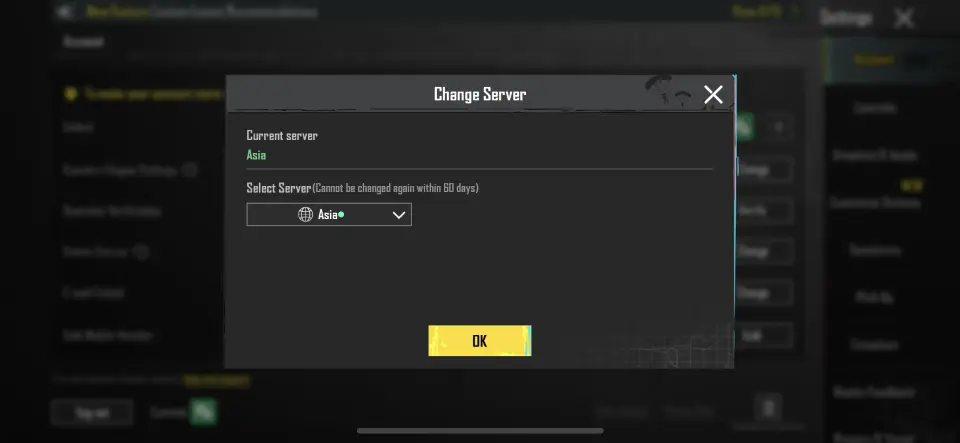
Within the Settings menu, locate the ‘Account’ section. Here, you will see the ‘Select Server’ option.
Choose Your Server
Click on the ‘Select Server’ option, and a list of available servers will appear. You can now choose the Server you prefer. Each Server will display its ping, so consider picking one with low ping for a smoother gaming experience.
Confirm Your Choice
Once you have selected your desired Server, confirm your decision by clicking ‘Ok.’
How To Change Your Region
Changing your region allows you to play on servers located in different geographic areas. Here is how you can change the region.
Open PUBG
Launch PUBG on your device.
Go to Settings
Click on the ‘Settings’ icon located at the bottom right corner of the main menu.
Access Country/Region Settings
Look for the ‘Country/Region Settings’ option within the Settings menu.
Make Your Selection
Click ‘Change’ next to ‘Country/Region Settings’ to choose your desired country or region.
Remember, just like server changes, you can change your region only once every 60 days.
Key Features of Changing Servers in PUBG
- Multiple Server Options
PUBG 2025 allows players to choose from a variety of regional servers including North America, Europe, Asia, and more. Selecting the right server can reduce lag and provide a smoother gameplay experience. - Easy In-Game Server Switching
Players can switch servers directly from the game’s main menu without needing additional software. The process is straightforward, ensuring even new players can do it quickly. - Ping and Latency Display
PUBG 2025 shows the ping for each server before joining. This helps players choose the server with the lowest latency, improving responsiveness during matches. - Cross-Region Gameplay Options
The game supports cross-region matchmaking for friends from different regions. You can team up with friends across the globe by selecting a mutual server.
Server-Based Events and Rewards
Some special events, tournaments, or seasonal rewards are server-specific. Changing servers allows players to access different in-game events and exclusive rewards
Related Posts:-
Final Words
In conclusion, changing servers and regions in PUBG allows you to enjoy the game with friends from different parts of the world and optimize your gameplay experience. However, it is important to be mindful of the 60-day limitation on these changes. So, choose your Server and region wisely, and get ready for exciting PUBG adventures.
![How to write PUBG Name in Style?[♗🍟 𝐲Ⓞ𝓾R 𝓃ᵃⓂ€ ☝♪]](https://elitepbgname.com/wp-content/uploads/2023/07/a-high-impact-youtube-thumbnail-design-f_OFLsPd8MQdKf359MWMhamQ_GEA-tuCySlu7Qso6ENxpwQ-768x431.jpeg)